


Enterprises are expanding their use of AI to tasks that involve navigating business systems and carrying out defined procedures. OpenAI’s GPT-6 Astra and Google’s Gemini 3.5 Flash show how major AI companies are developing Computer Use for this kind of work.
Computer Use raises a practical question for recurring work: Can a task completed today be performed accurately under the same standards next week and next month? Interfaces and input values may change between runs. Costs also accumulate when a model must inspect the screen and decide what to do at every step.
In an enterprise environment, Computer Use needs to account for accuracy, execution costs, and maintenance when a task fails. The question for enterprises is which tasks can be repeated reliably, and how to keep the time and cost of each run under control.
Which Workflows Are Suitable for Computer Use?
Many employees regularly move between systems such as ERP and CRM. A typical task involves downloading data, processing it, and uploading the result to another system.
Even when the procedure is well defined, repeating it every month takes time. Automating the entire task can be difficult. Some steps lack API access, and changes to the interface can affect execution.
Consider a finance team member closing monthly expenses. They download expense records, receipts, and invoices from one system, upload them to another, and check that the files were processed correctly. The steps on each screen are known, but login status, file names, and input values can vary. Once the upload is complete, they also need to confirm that the uploaded amounts match the expense records.
A workflow is a good candidate when it has a clear starting point and defined criteria for confirming completion.
Can a Demonstrated Task Be Run Repeatedly?
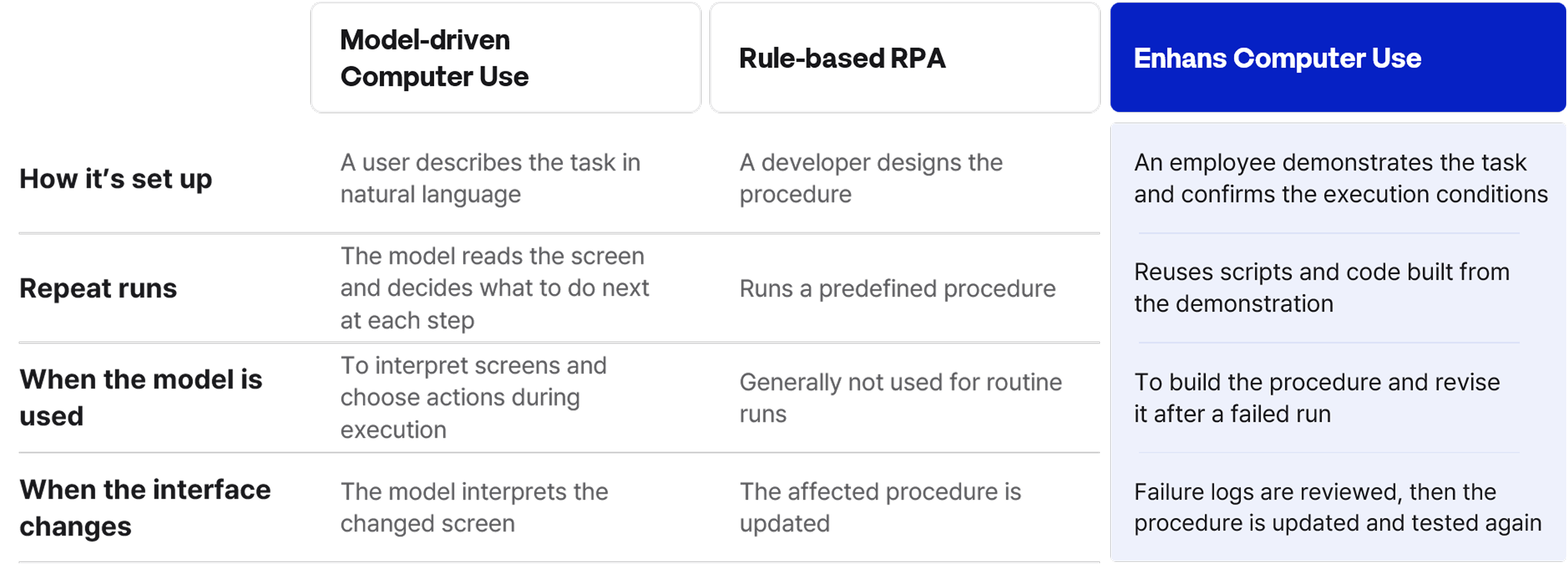
With Enhans Computer Use, the person responsible for a task first demonstrates how it is done. They show the screens, clicks, input values, and where the output should be saved. The demonstration also helps establish what the task is meant to accomplish.
As AI organizes the demonstration, it asks about conditions the screen recording alone cannot explain. How should the upload file be selected? What should happen if a required field is empty? Which screen confirms that the task is complete? The answers become part of the automation procedure.
Enhans then turns the procedure into scripts and code and tests how they perform. Once the responsible employee reviews and approves the test result, the procedure can be reused for the same task. Reducing the number of times the model needs to interpret the screen during repeated runs can make token costs easier to manage as volume grows.
The table compares three common approaches to repetitive work.
What Happens When the Interface Changes?
Browser and desktop interfaces change. Buttons may be renamed, input fields may move, and files may be saved in a different location. An unexpected dialog can interrupt a task. A reusable script still needs a way to handle these changes.
The execution history shows where the task failed and what caused it. The responsible employee can use that record to revise the execution logic with AI. The revised task is tested again and approved before it is used.
Can Computer Use Support a Broader Workflow?
Enterprise work often continues after data has been retrieved or transferred. The team may still need to interpret the data, include it in a report, or respond to a question. Screen-based tasks and writing tasks therefore need to connect within the same workflow.
For example, imagine a marketer receives an email asking about campaign performance. They need to access the CRM, download the relevant figures, and organize them according to established criteria. Computer Use can perform these screen-based steps and store the organized results in an ontology database. The figures are then connected to the company’s business rules and the marketer’s decision criteria.
The data is linked to the criteria the marketer uses to interpret it. If CPC rises, which other metrics and operating conditions should be checked? If CTR falls, how should changes in creative assets or audience targeting be examined? AI can refer to the data and business knowledge organized in the ontology to interpret the performance changes and draft a response. The marketer reviews the draft response and gives final approval.
In AgentOS, these steps can form one workflow: Computer Use gathers the data, the ontology connects it to business criteria, generative AI drafts the response, and the responsible employee reviews and approves it before the subsequent action is carried out.
What Enterprise Computer Use Needs: Predictable Accuracy and Costs
Frontier AI models can inspect an unfamiliar screen and decide what to do next. For a task performed every day, an enterprise also needs to consider the time and tokens spent interpreting the screen on each run. It needs to know whether the same procedure produces consistent results.
Tasks such as downloading records, filling out forms, and collecting materials follow established procedures. Enhans captures an employee’s demonstration as scripts and code for repeated execution. If an interface change causes a failure, the execution record helps identify what needs to be revised. Enterprises can then track whether each run meets the expected standard, how long it takes, and when the model is used.
Reducing repeated screen interpretation may lower the time and token cost per task. Enterprises can record execution time and model usage to measure any savings and estimate costs as volume grows. When they can assess completion quality and operating costs against clear criteria, they can decide where Computer Use is ready for sustained use.

in solving your problems with Enhans!
We'll contact you shortly!