


The more complex a multi-agent system is on the inside, the simpler it should feel to the user on the outside.
At the Lee Sedol demonstration, multiple agents were working simultaneously. While the PM Agent planned, the Design Agent designed, and the Coding Agent built. But what the user saw was a single conversation window.
The user had no reason to know what was happening inside the system. They made a request and received a result. In Part 1, we covered how agents communicate and collaborate. This time, we cover how that complex system appears as a single interface.
Why Each Agent Needs to See Different Information
Multi-agent systems are powerful, but that power comes with trade-offs. Agents can reach conflicting conclusions, decisions made by one agent may not reach another correctly, and sharing the full context across all agents drives token costs up dramatically.
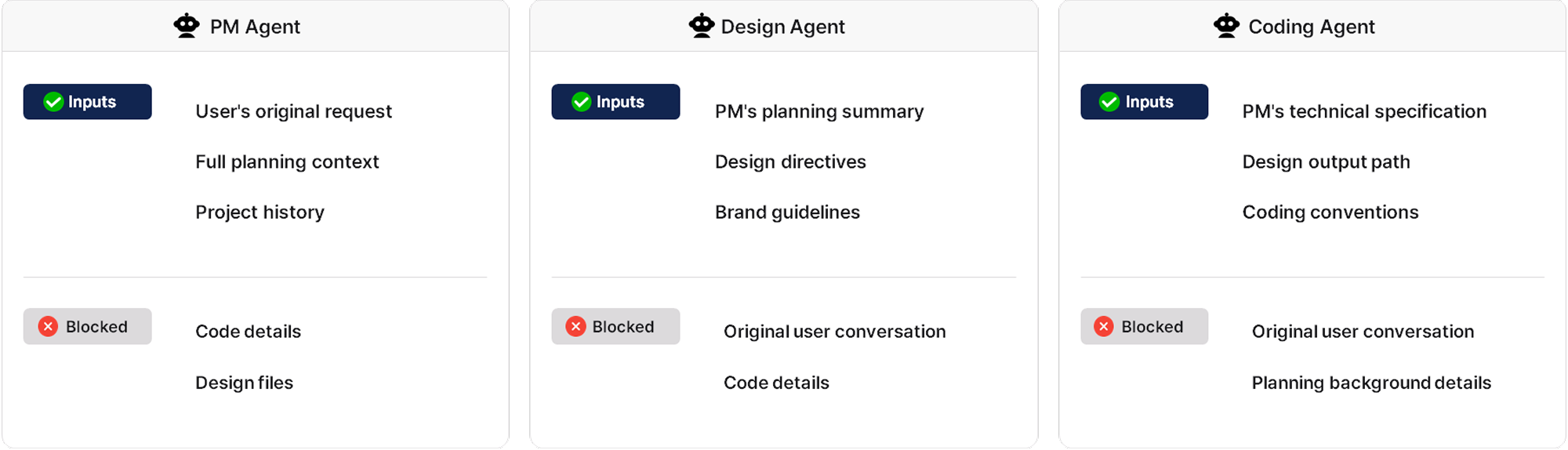
Enhans addressed this by assigning each agent a distinct role, passing only the information that role requires, and structurally blocking the rest.
The PM Agent receives the user's original request, the full planning context, and project history, but does not see code details or design files. The Design Agent receives only the PM's planning summary, design directives, and brand guidelines, not the original user conversation or detailed implementation.
This context separation allows each agent to focus entirely on its own role, and structurally prevents the confusion and cost waste that comes from unnecessary information.
Bridge Layer: From User Input to Agent Execution
Once roles are separated through context isolation, the Bridge Layer handles passing messages to the right agents. The flow from user input to agent execution runs in three stages.
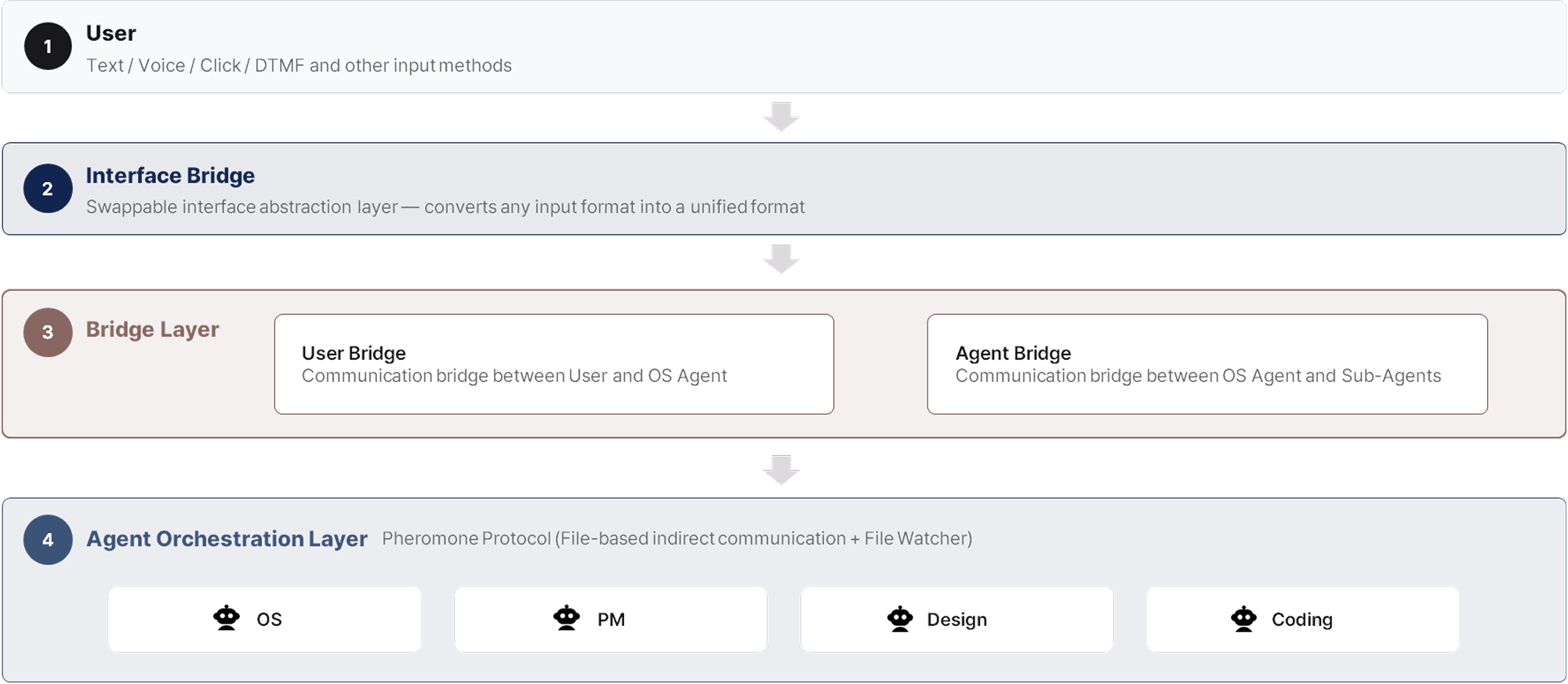
First, the Interface Bridge receives input from the user in various forms, including text and voice, and converts everything into plain text regardless of format. Whatever the input type, all subsequent processing follows the same path.
Second, the User Bridge converts that text into a structured format and injects the context the OS Agent needs. Recent conversation history is included in relative detail, while prior task history is compressed into metadata such as "the Coding Agent created the login module." The OS Agent receives this structured data and can focus entirely on interpreting the user's intent and deciding what to do next.
Third, the Agent Bridge delivers the OS Agent's decisions to each sub-agent, registering a return address at the same time. This pre-specifies where results should be sent when a task is complete. When the OS Agent delegates to the PM Agent, "OS" is registered as the return address. When the PM Agent further delegates to the Design Agent, "PM" is registered. Once a task is complete, each agent sends its result to the registered return address. Agents have no need to determine where to send their results. The Bridge Layer handles delivery to the specified address.

Even when multiple tasks are running in parallel, the return address system keeps task order from becoming tangled. Agents focus on reasoning and execution. Message delivery, context enrichment, and safety checks are handled by the Bridge Layer. Agent performance and Bridge stability can each be developed independently.
HITL Gate: Why Not Every Decision Is Left to the AI
It would be convenient if agents could handle every task on their own, but ambiguous requests and significant directional decisions require confirmation from the user. The HITL Gate (Human-In-The-Loop Gate) is the mechanism that lets the system determine when to check in with the user.
When a sub-agent determines that user input is needed, the Bridge Layer passes that to the Interface Bridge, and selection buttons appear in the UI. The agent enters a waiting state. Rather than asking "what would you like to do?", the system presents recommended options alongside the question.

When the user makes a selection, the input is delivered to the OS Agent through the User Bridge. Before calling the LLM, the OS Agent checks whether any agents are currently waiting. If a waiting agent exists, it routes directly to that agent without an LLM call. This reduces latency, cuts cost, and prevents semantic distortion.
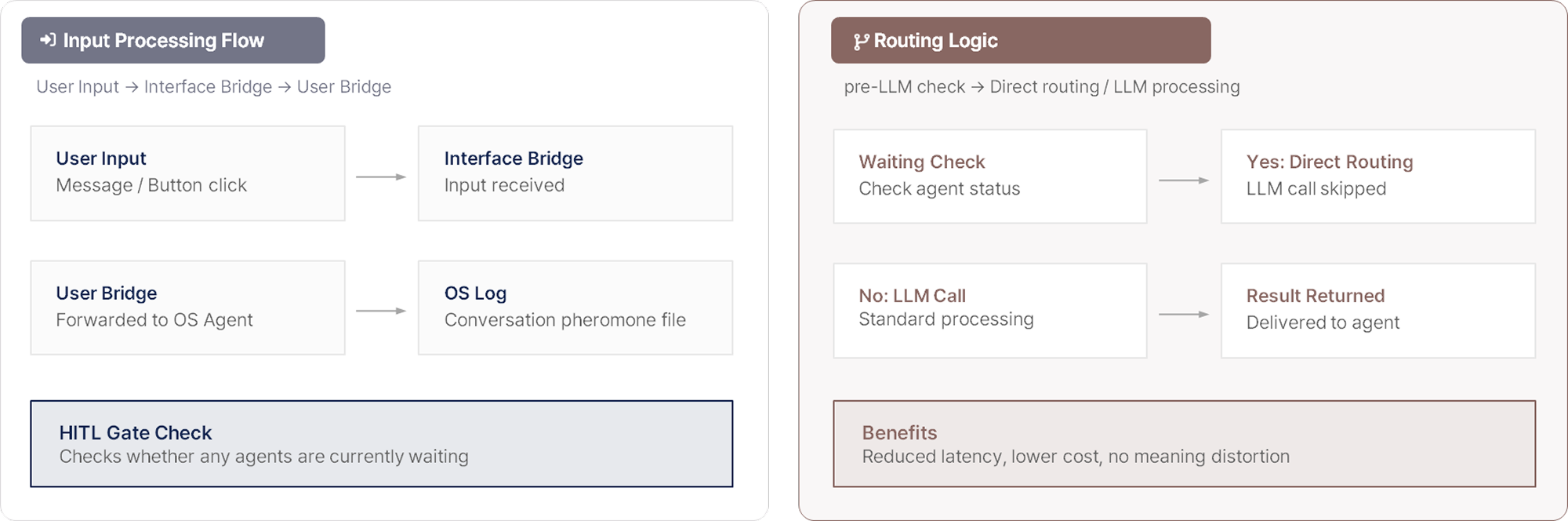
If no response comes within a set time, the system asks again. If there is still no response, it proceeds with the recommended option. Most tasks are handled quickly and automatically, with human input introduced only at the moments where a choice is needed.
Interface Bridge: How Agent Results Reach the User
So far we have covered how user input reaches agents. Now we cover the reverse: how agent results are delivered back to the user once a task is complete.
Inside an agent system, results take many forms including plans, images, code, and status updates. These need to be expressed differently depending on the environment, whether web, mobile, or voice. The Interface Bridge is the layer that solves this problem.
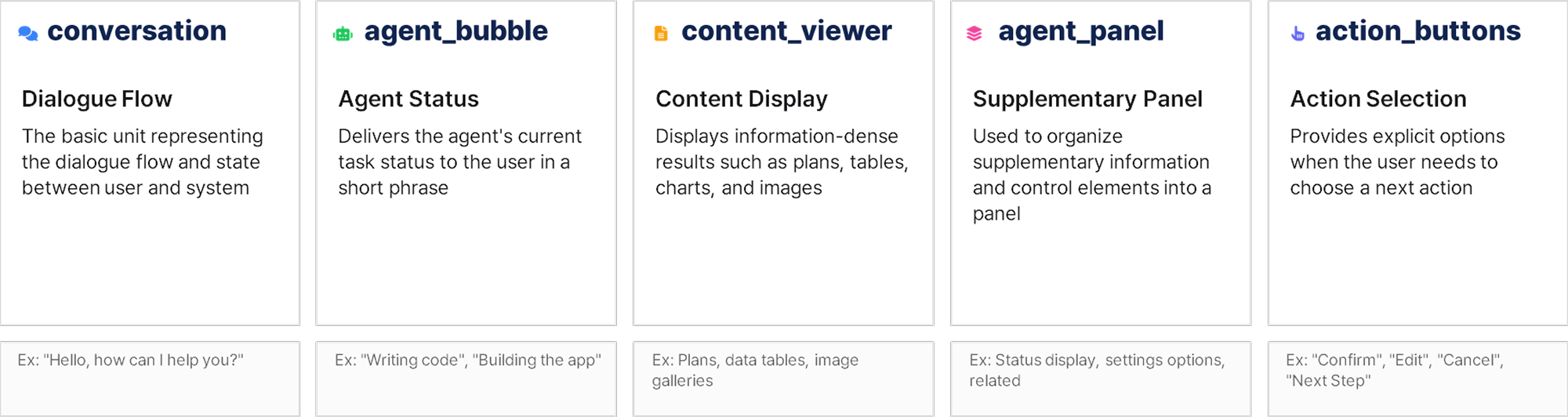
Agents do not depend on any specific UI implementation. They emit only five standard events. conversation carries the dialogue flow between user and system. agent_bubble delivers the agent's current task status in a short phrase. content_viewer displays information-dense results such as plans, tables, and image galleries. agent_panel organizes supplementary information and control elements into a panel. action_buttons presents options when the user needs to choose a next action.
The same event is delivered as a card on web, as a full screen on mobile, and as voice guidance on phone-based systems. Agents decide only what to deliver. How it is presented is handled by the Interface Bridge. When a system that runs on web needs to expand to mobile or voice, no agent code needs to change. Only the Interface Bridge implementation is swapped out.
Dual-Path: Fast Response and Conversation Continuity at the Same Time
Agent results are processed through two paths simultaneously.
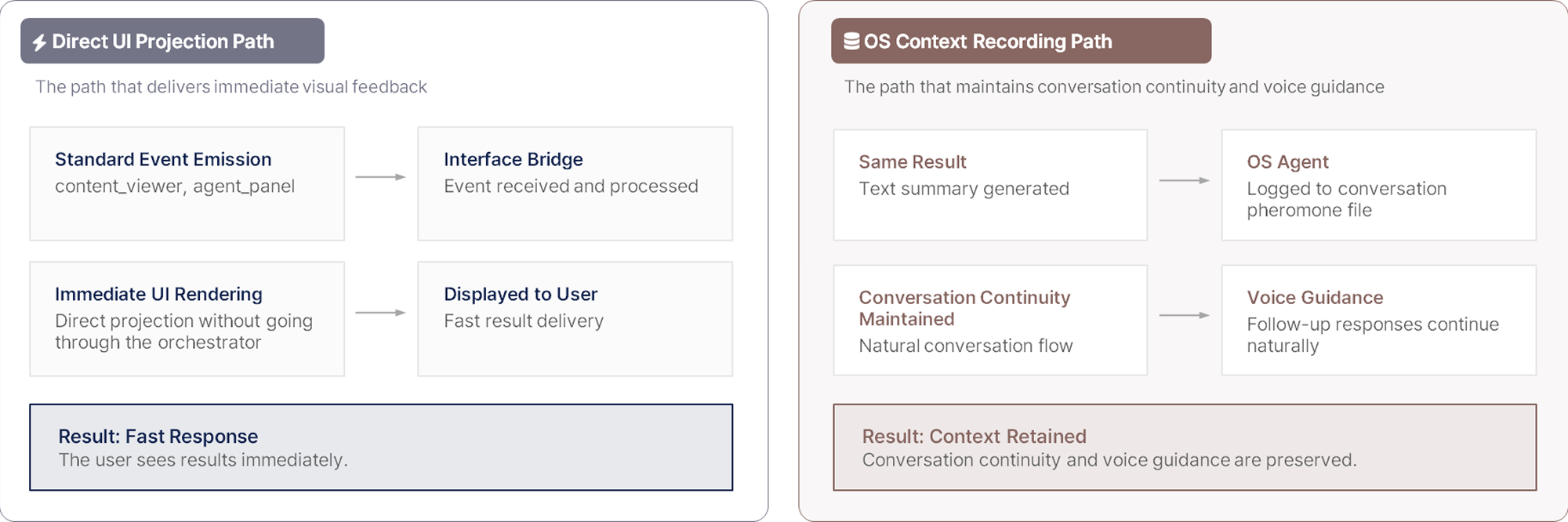
The direct UI projection path has the Interface Bridge receive standard events such as content_viewer and agent_panel and deliver them to the user immediately. Because this bypasses the orchestrator, response is fast.
The OS context recording path writes a text summary of the same result to the OS Agent's conversation pheromone file. This record is what allows subsequent voice guidance or follow-up reasoning to continue naturally.
UI delivery alone is not enough to maintain conversational continuity. With both paths running simultaneously, the user experiences a fast response while the system retains full context.
Closing: A Complex Agent System, One Consistent Interface
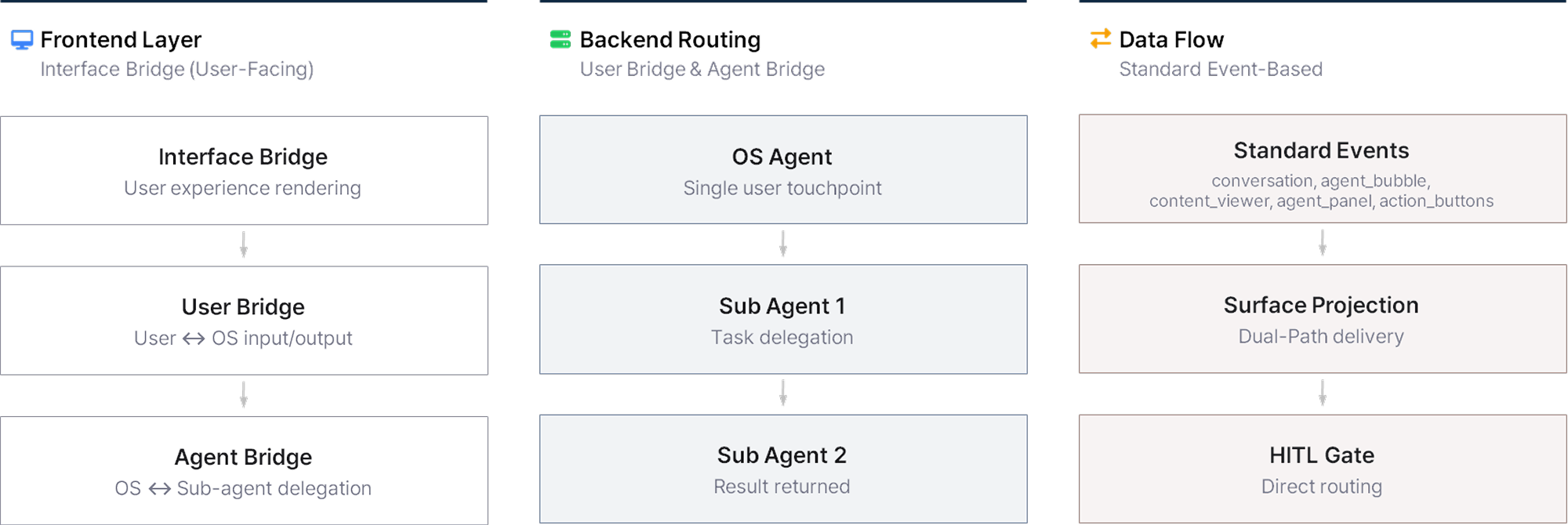
Each Bridge layer connecting users and agents is designed to handle message delivery, context enrichment, and result presentation precisely within its own role.
The Interface Bridge accepts any form of input through the same path. The User Bridge and Agent Bridge deliver messages to the right agent accurately. The HITL Gate lets the system itself determine when human judgment is needed. The Dual-Path delivers agent results to the user immediately while keeping context intact.
Agents focus on reasoning and execution. Connection, delivery, and presentation are handled by the Bridge Layer. Because each layer focuses only on its own role, users experience a single conversation window no matter how complex the system is inside.
That is why a system built on multiple AI agents still feels like one.

in solving your problems with Enhans!
We'll contact you shortly!